


 Can you help?
Futureshock 3D
Your Rating: Not Yet Rated
Average Rating: Not Yet Rated
RAM Requirement: 1 meg RAM
Control: Mouse and FuturePad
Release Status: Abandonware
Year: 1989
Publisher: Neeka Electronics
Developers: Jeff E Johnson
System 6 Compatible: Yes
Hard Drive Installable: Yes
 Download 2image Archive (769k)
 Download the manual in PDF format (465k)


All ebay results related to this archive:
No Results for 'Futureshock 3D' for the Apple IIGS available on Ebay
Current Apple IIGS related Auctions Listed By Time Left:
Vintage Software Apple II IIe IIc IIgs RUSSIA The Great War in the East
LEGO TC Logo - Super Rare DACTA - APPLE IIe & IIgs - Interface Card & Cable 9767
Apple ADB Touchpad Mouse Mice Replacement for G5431 m1042 M2706 A9M0331 IIGS IIe
Phonics Prime Time 1.0 by MECC for Apple II+, Apple IIe, Apple IIc, Apple IIGS
Sound Tracks 1.0 by MECC for Apple II+, Apple IIe, Apple IIc, Apple IIGS
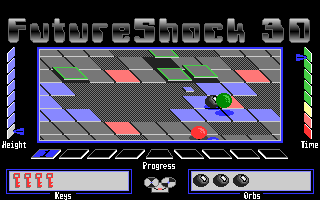
Future Shock 3D is rather unique for the IIGS; it was to go hand in hand with a new gaming peripheral, the Future Pad.
The Future Pad, from what I've heard, was like the Power Glove for the Super Nintendo. Whether it is or I can't say with certainty, not having read anything about it in Apple II journals, which lead me to believe both the game and the Future Pad weren't released. I have since found out otherwise, as I spotted an advert for the game in the classifieds in the back of InCider/A+ magazine. A gutsy move to develop a new game controller for the Apple II as it was becoming apparent at that time that the Apple II market was shrinking and developers were already jumping ship for more lucrative platforms. That's not to say I don't welcome new means for input for computer games - I think it's something that has been forgotten in recent years. Whatever happened to immersive virtual reality?
You can't play the game properly without the Future Pad, and the game will warn you when it's loaded that the Future Pad wasn't detected; the ultimate anti-piracy technique? Without the Future Pad, Future Shock becomes nothing more than a collectible piece of novelty software. You can control your ball with the mouse for directional controls and the mouse button stops your ball (it's effected by inertia). If you continue to keep the mouse button down, you can then view the entire play field by scrolling in the direction you want to see with the mouse. Without the Future Pad, you can't jump or do anything else that the recorded game, under the Play menu, demonstrates. It's a shame - the game looks quite interesting and well made.
However, Dagen Brock and Antoine Vignau have patched the game so the Future Pad is replaced with a joystick, so you may now play the game with more control than just the mouse.